

Every few years, the internet grabs hold of a new “work-from-anywhere” fantasy, and lately, virtual assistant jobs have become the star of that highlight reel. You’ve probably seen the usual suspects: someone tapping away on a laptop from a balcony overlooking teal water (never mind the humidity and terrible WiFi), or a TikTok influencer claiming they quit a miserable commute and now make five figures a month “just doing simple tasks.”
It’s a polished story.
It’s also missing… almost everything.
What the Virtual Assistant Job Market Looks Like
If you go searching for virtual assistant roles right now, you’ll run into thousands of listings: tiny startups begging for someone who can help keep things organized, overwhelmed founders juggling too many plates, real estate agents who have absolutely no business managing their own inbox, creators whose brand outgrew their capacity overnight, and yes, even the occasional Fortune 500 executive desperate for someone to stop their calendar from overflowing.
The phrase “virtual assistant” gets tossed around like confetti, but if you’re sitting here genuinely wondering whether this could be a real career for you, you don’t need confetti. You need clarity. You need the version of this job that isn’t shaped by ads for online courses or Instagram aesthetics.
Most Advice Misses the Point
Most of the public-facing advice is fluffy at best. “Be organized! Sign up for Upwork!” And then? Nothing. No real explanation of the actual work, the money, the learning curve, the client dynamics, the landmines, or the skill stacking that turns “just doing tasks” into a legitimate profession.
So this guide goes deeper into the practical, the day-to-day, even the slightly chaotic, plus the genuinely rewarding sides of VA work. By the end, you’ll know what the job really involves, how much VAs make, what skills matter, and what the path into this field looks like when you strip away the filters and get honest.
What a Virtual Assistant Actually Is
If you search the official definition, you’ll get something dry and dusty like, “a self-employed worker who provides administrative services remotely.” Technically… True. But it means about the same as calling a firefighter “someone who regularly encounters elevated temperatures.”
The modern virtual assistant is not a remote secretary answering phone calls from a quiet spare bedroom. In 2025, the job has evolved into something closer to an operational Swiss Army knife.
Examples of Real Virtual Assistant Jobs
Depending on the day, and/or the client, you might be the:
- Inbox Strategist: You’ll be sorting, tagging, rewriting drafts, and making sure your client only sees the five emails that really need attention; instead of the 147 that don’t. It’s half organization, half intuition.
- Calendar Traffic Controller: Think of every appointment as an airplane. You’re the one directing traffic, preventing collisions, catching double-bookings, and gently shifting meetings around so your client doesn’t fly into two Zoom calls at once.
- Digital Organizer: This is where you migrate files out of chaotic Google Drive folders with names like “Misc 2022??” and actually build a structure that makes sense. Sometimes it’s as simple as renaming things; sometimes it’s cleaning up an entire network.
- Customer Support Buffer: You step in between angry customers and an overstressed business owner. You answer the “Where is my order!?” emails, handle refunds, clarify shipping times, and rewrite confused messages; so they sound like they came from someone calm, not someone who only slept two hours.
- Social Content Helper: You’re not the full marketing department, but you make the online presence run. Expect to schedule posts, draft captions, pull screenshots for graphics, resize images… You know, all that behind-the-scenes stuff that keeps a brand going.
- Project Tracker: You recall who promises what, and when. Think checking in on tasks, updating project boards, chasing down missing pieces, and keeping everyone accountable and everything flowing. You’re basically the unofficial project manager… Just without the job title.
- Systems Builder: Every business eventually needs workflows. You’re the one creating repeatable processes: onboarding steps, content pipelines, checklist templates, automation triggers. This way, things stop being chaotic and start being predictable.
- Emergency Problem-Solver for 11:17 AM Fires: It could be a broken Zoom link, a client forgetting the password (to their own website), a file that just won’t upload, or a link on their sales page that broke mid-launch. Whatever jobs show up unexpectedly, virtual assistants are the first person someone message to fix it.
Why Virtual Assistant Jobs Even Exists
The shift happened because online businesses ballooned faster than their internal structure. Creators became brands. Solopreneurs built six-figure revenue streams. Small businesses suddenly needed entire workflows, content calendars, automated email sequences, customer support systems, and someone to remember that tax deadlines actually exist.
That “someone” is often the virtual assistant.
A good virtual assistant isn’t just checking boxes; they’re smoothing edges. They take a business owner’s scrambled thoughts and turn them into a clean lineup of tasks. Build order out of creative chaos. Turn half-written notes into polished content. They keep clients from missing appointments, forgetting obligations, or answering emails that would have been better left until tomorrow.
What VAs Are Not
This part gets glossed over too often, but setting expectations makes or breaks virtual assistant jobs. Especially in the beginning.
A virtual assistant is not:
- An On-Call Personal Servant: You’re not available 24/7, nor should you be. You’re a professional, not someone’s emergency life assistant.
- A Mind Reader: Clients often think they’ve given clear instructions, but vague messages happen. Your job is to clarify, not to magically decipher three confusing sentences into a 20-step workflow.
- A Therapist for Overwhelmed Founders: Business owners burn out, panic, spiral, procrastinate, and sometimes overshare. Supporting them does not mean carrying the emotional load of the entire company.
- The Default Person: You’re not responsible for everything no one else wants to touch. If the task belongs to an accounting or sales or a specialist, you’re not automatically the cleanup crew.
Good virtual assistant-client relationships runs on:
- Clear Communication
- Realistic Expectations
- Healthy Boundaries
- Mutual Respect
- Shared Responsibility
With these things lined up, virtual assistant jobs are a career you can actually enjoy and stick with. Virtual assistant jobs only work well when both parties know where the boundaries are, what’s expected, and how to treat each other with respect.
Virtual Assistant Jobs Are Growing Like Wildfire
A bunch of forces collided in the past few years to create the perfect storm for virtual assistant jobs growth:
- Remote Work Became the Default: Before 2020, remote roles were treated like perks or rare exceptions. Now? They’re the standard for huge portions of the workforce. Companies aren’t “trying out” remote models anymore. They’re fully built in around them. And with remote teams comes the need for remote support, which is exactly where virtual assistants thrive.
- Small Businesses Exploded: Small business ownership exploded post-2020. A lot of people opened online shops, coaching practices, digital agencies, real estate operations, or countless other side businesses. But most of those founders can’t afford full-time employees… Or just didn’t want the commitment. Virtual assistants became the perfect solution. Flexible hours, Lower cost. Someone who can jump between administrative tasks, operations, content overview or creation, and customer support… all without needing an office chair? Yes, please!
- Executives Need Some Relief: Everyone from mid-level managers to top executives started drowning in meetings, follow-ups, a constant stream of emails, and way too many half-finished projects. Hiring a full-time assistant wasn’t always in their budget (or the HR plan), but bringing on a VA who could flex up or down? Much easier. Many executives now rely on VAs the same way they relied on in-office admin staff, just without the overhead.
- Companies Want Agility, Not Long-Term Cost Commitments: Hiring contractors feels safer to many companies. Budgets shift quickly. Workload fluctuates. A VA lets businesses adjust without going through a three-month hiring process or a painful layoff cycle. It’s operational flexibility. And now, it’s something companies value more than ever.
- Technology Finally Caught Up: Apps like Asana, ClickUp, Slack, Notion, Google Workspace, AI editors, and automation software make it possible for a virtual assistant to run nearly any back-end job from a laptop. You can manage an entire business from anywhere with a stable connection: project management, scheduling, CRM updates, content systems… You name it.
Virtual Assistant Jobs Solve a Modern Problem
The virtual assistant job sits at the intersection of flexibility and necessity. It’s cheaper than hiring an entire administrative team, faster to onboard, and more scalable than traditional staffing. That’s why job boards are flooded with virtual assistant openings and why everyone from Etsy sellers to eight-figure CEOs has at least one VA somewhere in their workflow.
The Different Types of Virtual Assistant Jobs
Most virtual assistants don’t stay in one lane forever. The field is too broad, too flexible, and too ripe with opportunity. But here are the core categories most people start with, and the directions they often grow into.
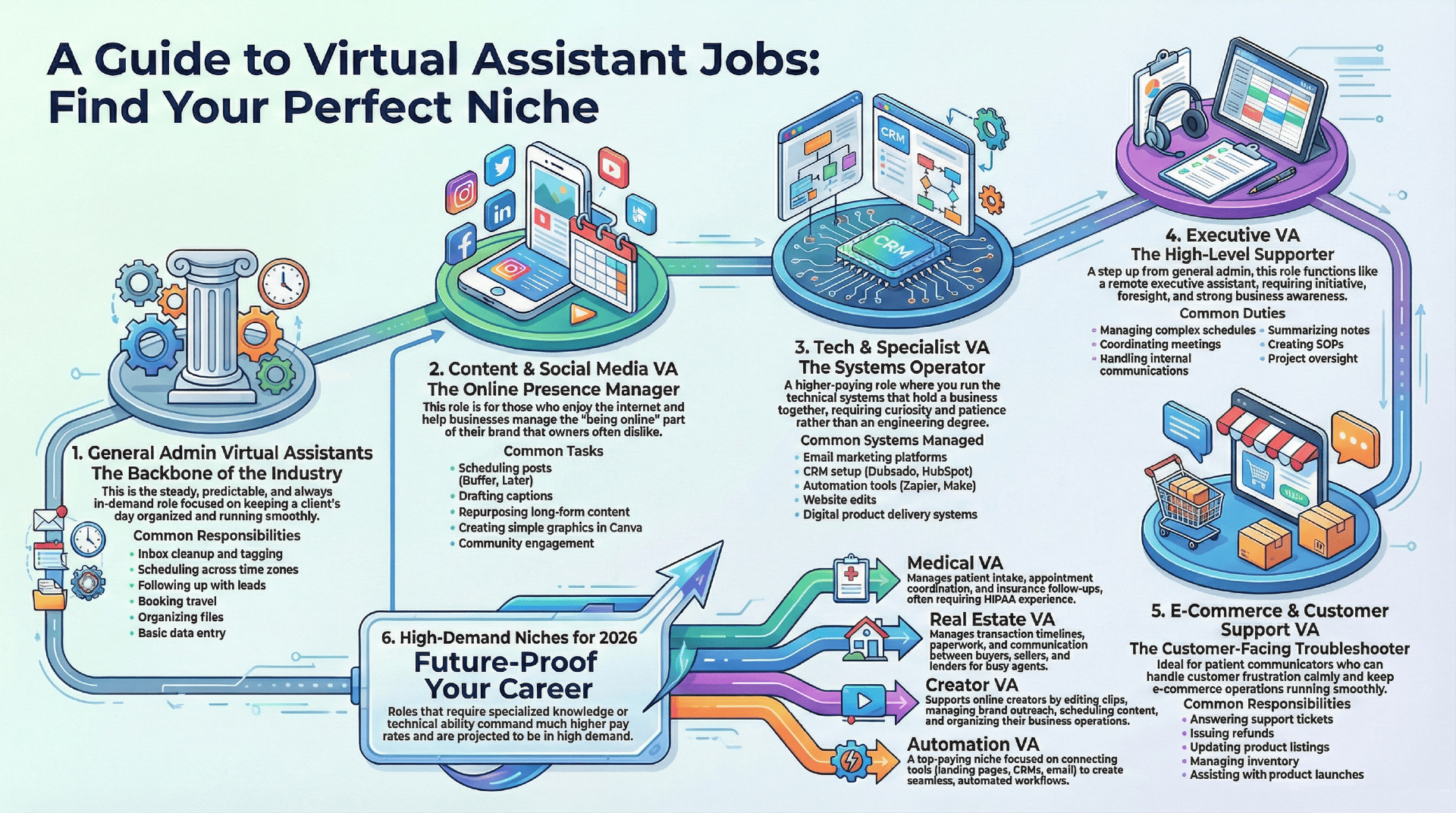
1. General Admin Virtual Assistants
This is the bread-and-butter virtual assistant job. It’s steady, predictable, and always in demand. You help keep a client’s day moving without anything falling through the cracks.
Common responsibilities include:
- Inbox cleanup and tagging
- Scheduling across conflicting time zones
- Following up with customers or leads
- Booking travel
- Organizing files and documents
- Basic data entry
Is it glamorous? No, not really. Is it the backbone of the entire virtual assistant job industry? Absolutely.
Many successful VAs build their careers starting right here. Because once you prove you’re reliable, clients trust you with higher-level work.
2. Content & Social Media VA
This is huge right now. Every business is online, but most business owners hate managing the “being online” part.
Common tasks:
- Scheduling posts in tools like Buffer, Later, or Metricool
- Drafting captions
- Repurposing long-form content (like a YouTube video or podcast) into a bunch of smaller videos
- Simple graphics using Canva
- Community engagement: replying to comments, messages, and tags
This role fits people who genuinely enjoy the internet: the trends, the formatting, the pacing. It also grows quickly because once clients trust your content judgment, they hand off more and more of their creative tasks. If you have an eye for style and enjoy online spaces, this niche grows quickly.
3. Tech & Specialist VA
This is where the rate jumps up. You’re not doing simple administrative work anymore. You’re running the systems that hold entire businesses together.
These virtual assistant jobs deal with:
- Email marketing systems
- CRM setup and maintenance (Dubsado, HoneyBook, HubSpot, etc.)
- Automation tools (Zapier, Make)
- Website edits and blog formatting
- Digital product delivery systems
You don’t need an engineering degree. You just need curiosity, patience, and the willingness to click every button until something finally works. Clients love a virtual assistant who can fix a tech problem they’ve been avoiding for six months.
4. Executive VA
This is a step up from general admin. You’re closer to a remote executive assistant. You support high-level professionals who need someone to keep their entire workday functioning smoothly.
Executive virtual assistants typically handle:
- Managing complex, layered schedules
- Coordinating internal and external meetings
- Internal communication between multiple teams
- Summarizing meeting notes or prepping documents
- Creating SOP (Standard Operating Procedures) files
- Progress oversight on multi-step projects
This virtual assistant job requires entrepreneurial skills like initiative, foresight, strong business awareness, and the ability to stay calm when your client’s calendar suddenly implodes. Executive VAs often become indispensable.
5. E-Commerce & Customer Support VA
Perfect for patient people who can glide through customer frustration without combusting and can stay composed even when customers… aren’t.
Common tasks include:
- Answering support tickets (“Where is my order???”)
- Issuing refunds and processing returns
- Updating product listings
- Managing inventory spreadsheets
- Coordinating and/or assisting promotion launches or sale events
Many Shopify stores and Etsy shops run successfully with just one owner and one strong customer-support VA. If you’re good at communication and troubleshooting, this path is stable and almost always hiring.
6. High-Demand Niches for 2026
Virtual assistant jobs that require specialized knowledge, judgment, or technical ability bring in much higher pay rates.
Some of those Virtual assistant jobs are:
- Medical VA: Clinics and private practices get overwhelmed with patient intake, appointment coordination, insurance follow-ups, and the occasional billing task. VAs fix that. You’ll be dealing with people’s most sensitive information. So confidentiality non-negotiable. Having some HIPAA experience can also make you instantly more valuable. That’s why these virtual assistant jobs get paid more than others.
- Real Estate VA: Real estate agents deal with a ridiculous amount of paperwork and deadlines. That’s is why many of them hire VAs to keep their deals on track. In this niche, you’d manage transaction timelines, follow up with leads, organize documents, or act as the communication bridge between buyers, sellers, lenders, and everyone else involved. It’s busy work… but lucrative.
- Creator VA: Creators are full-scale businesses now. Merch stores, sponsorship deals, social calendars, content pipelines, etc. virtual assistant jobs in this space help edit short clips, manage brand outreach, schedule content, and organize the chaos behind fast-moving creators.
- Automation VA: Businesses rely on workflows more than ever. You wire all the tools together: landing pages, forms, email sequences, calendars, CRMs, etc. Everything ends up running smoothly, and automatically… instead of snagging or falling apart. If you enjoy figuring out how systems talk to each other, this niche can become one of the highest-paying ones.
Whichever path you end up taking, there’s real room to grow. Creative, technical, organized, or people-oriented. Whatever your strengths are, there’s a niche that actually wants them.
What Virtual Assistants Actually Do All Day
People love to sum up a virtual assistant’s responsibilities with one vague line: “You do whatever the client needs.”
Technically… yes, it’s true.
But that tells you nothing about what your work days actually look like or how your time gets divided.
A virtual assistant job tends to fall into the same handful of collar color categories: tiny tasks, recurring tasks, one-off projects, and sudden unexpected problems that show up with no warning at all.
Tangible, Daily Tasks
These are the background things that keep businesses from toppling over:
- Inbox Sorting: Picking out the three important emails hidden inside forty unimportant ones. Half admin, half detective.
- Following Up on Forgotten Tasks: Messaging someone (nicely) to do the thing they said they’d finish three days ago.
- Tidying Files and Documents: Renaming files, fixing formatting, archiving old content. Turning a digital junkyard into something workable.
- Small Bursts of Research: Anything from “find five podcast guests” to “compare three software tools” to “find the best flight that doesn’t involve a 10-hour layover.”
- Fixing Micro-Annoyances: Permissions errors, broken links, odd glitches in Google Docs, Zoom links that expire… the stuff no one else wants to troubleshoot.
None of these tasks are huge on their own.
But together?
They keep the entire business running.
A Real “Day in the Life” Scenario
Imagine your job is a virtual assistant, working with three clients:
8:00 AM
Coffee. Check your own inbox. Untangle your thoughts. Get your bearings for the morning. Sometimes you have a plan; sometimes you find that the entire plan was replaced while you were sleeping.
8:30 AM
Client A (a real estate agent) desperately needs her inbox cleared, again.
She’s drowning in emails. You sift through her inbox, flag the three buyer inquiries, file newsletters she’ll never actually read, and delete all the spam so she can only see the messages that actually earn her money.
9:00 AM
Client B (a life coach). He has a webinar tomorrow. You log into his email marketing tool to make sure everything is set up correctly… and good thing you checked. One link is broken. Get it fixed before it becomes a “Why isn’t this working?” crisis.
10:00 AM
Creative work for Client C (an e-commerce store). Deep focus time. You’re writing product descriptions for a new candle line. You need warm, cozy, sensory copy that gets the tone right. This is the kind of task that makes two hours just fly by.
12:00 PM
Lunch. Yoga. Walk the dog… Remember you forgot to pull chicken out of the freezer. Again.
1:00 PM
Client A again. She double-booked herself. You untangle her calendar, send polite rescheduling emails, and smooth over the mistake so her clients never even know it happened.
2:00 PM
Skill-building hour: a Notion tutorial, a ClickUp deep dive, maybe testing a new automation idea. This is unpaid work, but it’ll be the reason you can charge double three months from now.
3:00 PM
Send daily updates to your clients: what’s done, what’s in progress, what you need from them. These small summaries keep everyone aligned and keep you from getting 2 AM “just checking in” messages.
Then you close the laptop. The workday is over.
Not glamorous. Nor impossible. Just steady, meaningful work. That gets done from home, on your terms.
Skills Needed to Succeed
Not all virtual assistant job skills are created equal. Some skills you’ll need on day one. Others you can pick up as you go… Googling something at 2 AM and having the breakthrough moment of “Oh… THAT’S why it wasn’t working.”
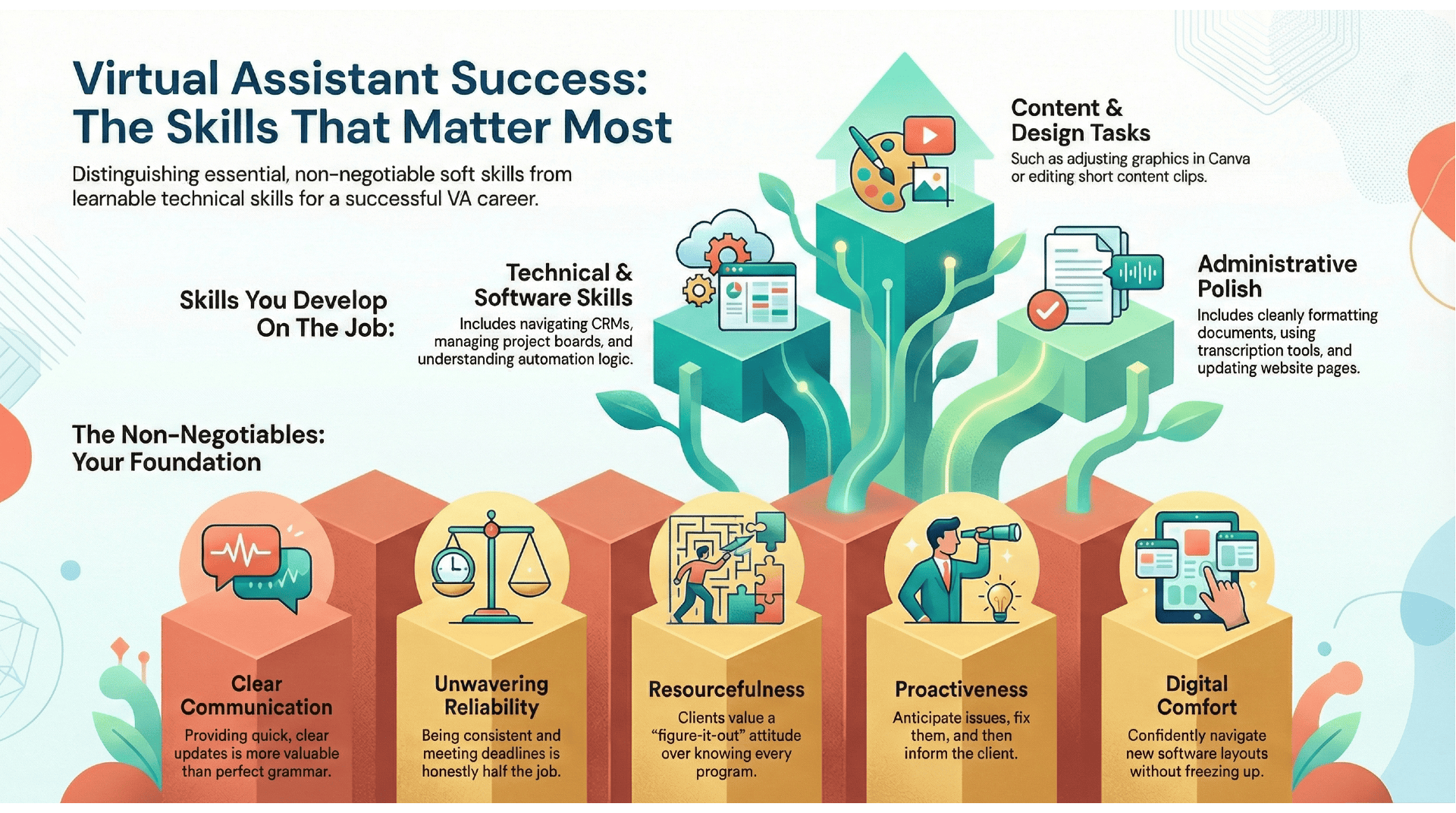
Let’s break this down into the skills that matter most.
The Non-Negotiables
- Communication: Clear writing > perfect grammar. Clients don’t need poetry; they need updates. A quick “Got it! Finishing this today” prevents 90% of misunderstandings. Silence is what makes clients panic.
- Reliability: If you disappear, the whole system collapses. Clients expect they’re hiring for consistency. Being there when you say you will, meeting your deadlines, and, most importantly, not disappearing on clients, is honestly half the job.
- Resourcefulness: You will not know everything. No one does. What clients want is someone who says
“I haven’t used this program before, but if you give me just a minute or two to figure it out, I’ll get on it!”
That attitude keeps clients returning to you. - Proactiveness: See the problem. Fix the problem, and then tell them you fixed the problem. Great VAs anticipate.
“Hey, I noticed this link was broken, so I fixed it,” makes you unforgettable. - Digital Comfort: Most daily tasks aren’t technically difficult… Unless you freeze when you see a new software layout. You’re the one reading the instructions all the way through, not guessing halfway and hoping it just ‘works out’.
Skills You Can Develop on the Job
There’s a huge misconception that you need to know ALL the tools before you start. You don’t.
These are the skills you build naturally over time as you get better at work:
- Formatting documents cleanly
- Navigating new CRMs
- Understanding basic automation logic
- Adjusting graphics in Canva
- Managing project boards
- Editing short content clips
- Using transcription tools
- Updating website pages
Most virtual assistants learn these by simply… being forced into them. Your first few months are often just you and Google/AI, bonding intensely.
Your Starter Tech Stack
You don’t need all the tools. You don’t even need ten. Just how to use the basics well enough to not break anything.
Here’s the toolkit almost every virtual assistant job starts with:
- Gmail or Outlook: For inbox management, filters, tagging, and sending messages that don’t sound robotic.
- Slack / Teams / Zoom: Your new “office hallway.” You’ll be here frequently: quick team chats, video calls, and even the occasional work-safe meme… for morale.
- Trello / Asana / ClickUp / Notion: Pick one. Learn at least one deeply. This is where your tasks can be found; and where you’ll track what needs doing and when.
- Toggl or Clockify: Even when you charge flat fees, tracking your time helps you understand your workload; and whether you’re underpricing yourself.
- Canva: Create/Update graphics, social posts, simple PDFs, and anything that needs to look “not embarrassing.”
- LastPass or 1Password: If a client ever sends you their password in a text message, you gently guide them into the light. Secure password sharing is non-negotiable.
Most of a virtual assistant’s work can be summed up like this: Know where the buttons are… and don’t be afraid to press them.
Skills That Help You Stand Out
These aren’t mandatory, but they make you far more competitive:
- Light copywriting
- Basic analytics (Google Analytics, social insights)
- Simple video editing (CapCut, Descript)
- Calendar troubleshooting (especially with cross-time-zone clients)
- Automation basics (Zapier triggers, conditional logic)
- Understanding how online businesses actually make money
None of these need to be mastered on day one. You grow into them as your clients’ needs evolve.
The Real Secret Skill: Judgment
This is the part no one teaches. Over time, you start developing a sixth sense for:
- When to reply immediately and when to wait
- Which tasks matter most to the client’s bottom line
- Which mistakes actually need fixing
- When a client’s vague message means “help me think this through”
- When to speak up about a better workflow
Judgment is what transforms you from someone who “does tasks” into someone who adds value.
How Much Virtual Assistants Make
Money conversations in the virtual assistant world get loud fast. Some people talk like everyone hits six figures by accident; others act like VA work barely pays the bills. The truth is somewhere in that reasonable middle ground where the work is flexible, the pay is wide-ranging, and your income depends on what you can handle, not what or how many certificates you bought.
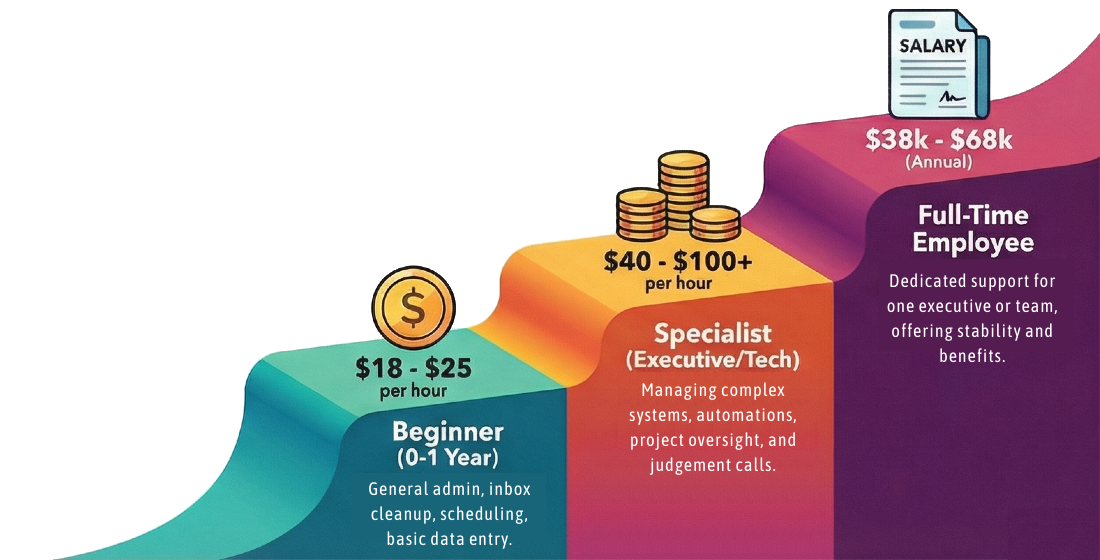
0-1 Year
$18-$25 an hour. Beginners here usually charge somewhere between $18 and $25 an hour. Nothing wild. Nothing embarrassing. You’re still getting a feel for each client’s communication style, what they expect from you, and which tasks make you think, “I could do this all day,” versus “never again.”
Most of the early work is the basics: inbox cleanup, calendar juggling, follow-ups, data entry, and quick research projects. The everyday things that make a client breathe a little easier. Your biggest asset isn’t your experience; it’s your reliability. If you show up when you say you will and don’t freeze when you see a new software layout, people will stick with you.
1-3 Years
$25-$40 an hour. After you’ve supported a few clients and have stopped googling “how to download a PDF again,” your rate naturally moves up. Most virtual assistant jobs fall in this generalist-but-experienced tier making around the $25-$40 an hour range.
You’ll no longer check in constantly or have to ask for clarification every time. Clients can hand you a cluster of tasks and trust you’ll turn it into a plan that gets done. You might dabble in content scheduling, social tasks, customer support, or simple tech updates. Nothing too fancy, but definitely beyond “basic admin.”
Executive, Ops, or Specialist
$40 to $65 an hour. This is where income shifts noticeably. Clients pay more for people who keep their world from falling apart.
Executive and operations-focused virtual assistant often earn $40 to $65 an hour because they’re handling calendars with moving pieces, prepping meeting materials, organizing internal communication, smoothing over mistakes, and generally being the calm person in a room full of deadlines.
You’re not just “doing tasks.”
You’re handling judgment calls.
Automations, CRMs, Systems
$50-$100+ per hour. Tech-savvy virtual assistant, the ones who can fix a broken Zapier connection or clean up a messy CRMs, consistently land at the top of the pay scale. It’s normal for these specialists to charge $50-$100+ per hour, depending on what they can solve.
The work isn’t glamorous: testing triggers, watching error logs, connecting landing pages to email marketing tools… but clients pay for someone who can make all of that work without breaking everything.
The bar here is simple:
If you can fix the things a client avoids, you can charge accordingly.
Full-Time Salaried Virtual Assistant Jobs
$38,000 and $68,000 a year. Not everyone wants the contractor life. Some companies hire virtual assistants as full-time employees, usually somewhere between $38,000 and $68,000 a year.
These roles often support one executive (or a small team) and offer:
- Predictable hours
- Steady paychecks
- Fewer clients to juggle
- Sometimes, even benefits
You lose some flexibility, but you gain that back in stability.
What Actually Changes Your Rates
Clients care about specific things. Virtual assistant job rates jump for reasons that have nothing to do with seniority and everything to do with your impact.
Rates tend to rise when you:
- Start turning work around faster
- Make fewer errors
- Take ownership of recurring tasks
- Learn tools clients depend on
- Prevent expensive mistakes
- Spot problems before they snowball
The moment a client realizes you save them hours, not minutes, your rate becomes easier to raise.
The TL;DR
You can earn good money with virtual assistant jobs, but it depends on your skills, not just your time. Hourly admin support earns the least (~$18-$40/hr), executive and operations roles earn more (~$40-$60/hr), and technical or automation-heavy work earns the most (~$50-$100+/hr). Finally, full-time employees usually make somewhere between $38,000 and $68,000 a year.
The VA field scales with you, and that’s part of what makes it so popular.
How Virtual Assistant Jobs Charge
Pricing trips up almost every new virtual assistant. Partly because the internet is full of people shouting different things, and partly because the “right” price depends on how you prefer to work. There isn’t one perfect model. Most virtual assistant try a few, mix and match, or switch entirely depending on the client.
Here are the pricing setups you’ll actually see in the virtual assistant world:
Hourly Rates
Most new virtual assistant jobs start with hourly pricing because it’s simple. You track your time, send the invoice, and that’s that. No math gymnastics, no complicated boundaries.
Hourly works well when:
- You’re learning
- The tasks vary wildly
- The client has unpredictable needs
- You’re not sure how long something will take yet
The downside is the obvious one:
- There are only so many hours in a day
- Once your calendar fills, your income caps out
Hourly is great for getting experience, but most virtual assistants eventually shift to something more stable once they know their speed and strengths.
Monthly Retainers
This is the sweet spot many virtual assistant jobs aim for; once you’ve found your footing. A retainer means the client pays a set amount each month. It’s usually for a block of hours or a bundle of recurring tasks.
For example:
- $800/month for 10 hours
- $1,500/month for 20 hours
- $2,000/month for weekly admin + inbox support
Retainers give you predictable income and make planning your month way easier. Clients also like them because they don’t feel like they’re “metering” your time every time they ask for something.
Retainers work best when:
- Your workload is steady
- The client needs ongoing support
- You know, at least, roughly how long most tasks take
- You want income consistency
They’re ideal for building long-term partnerships… not one-off projects.
Project-Based Pricing
This is where things get interesting. Instead of charging for your hours, you charge for the outcome.
A project might be:
- Building a ClickUp workspace
- Setting up a CRM like HoneyBook or Dubsado
- Organizing a digital file system
- Creating templates
- Setting up a full email sequence
- Cleaning up a messy operations workflow
Projects typically come with a higher price tag: $500, $1,200, $3,000. Depending on the complexity.
The upside? If you work efficiently, your effective hourly rate skyrockets.
The downside? If you underprice or run into unexpected snags, the project can eat a lot more time than you planned.
Most experienced VAs love project pricing because skill based pay rewards what you can do, not just the time spent staring at a screen.
Hybrid Models (What Most Established VAs Actually Use)
Very few seasoned virtual assistant stick to just one structure. Instead, they mix them:
- Retainers for ongoing admin support
- Project pricing for system-building
- Hourly for anything unpredictable or temporary
This lets you keep your baseline income steady while still taking on high-paying one-off work.
When and How to Raise Your Rates
One of the hardest parts of being a virtual assistant is knowing when you’ve “earned” the right to charge more.
Here’s the truth: you raise your rates when your value increases, not when the calendar changes.
Signs you’re ready:
- Clients stop questioning your pricing
- You’re consistently finishing work faster
- You’ve learned new tools
- You’re catching mistakes before clients notice
- Your clients rely on you for decisions, not tasks
- Your workload is full and you’re turning down inquiries
Many virtual assistants raise their rates once or twice a year. Sometimes more if they’re moving into a more technical or operations-focused niche.
The Real Goal
The best model is a pricing structure that doesn’t burn you out. One that gives you:
- Predictable income
- Flexibility
- Room to grow
- Enough breathing room to take on higher-paying work
Your pricing should support you… not suffocate you.
Is AI Going to Replace Virtual Assistant Jobs?
Every single person who considers virtual assistant work hits this moment:
“Wait a sec… isn’t AI just take these jobs soon?”
It’s an understandable question. The internet is full of dramatic dooms-day predictions and headlines. But here’s the truth… It’s simpler than people make it:
AI isn’t replacing virtual assistant jobs. Virtual assistants who learn to use AI will replace the ones who don’t.
AI can automate pieces of the work. It can speed things up. Draft rough versions of content and summarize long documents. But the part business owners desperately need: the judgment, the prioritization, the read-on-tone, the “Is this actually a good idea?” filter… AI can’t do that (yet, at least).
To make this clear, here’s how AI actually fits into the virtual assistant world right now:
What AI Is Good At
AI is great at repetitive, structured, predictable tasks. The things that take a lot of time but not a lot of creativity:
- Summarizing long emails
- Organizing rough notes
- Generating first-draft ideas
- Converting audio into text
- Rewriting something in a different tone
- Cleaning up messy formatting
- Creating quick reference sheets or templates
- Helping you brainstorm content angles
If a virtual assistant knows things like vibe coding, or how to prompt AI really well, they’ll become significantly faster.
Not robotic. Not replaced. Just way more efficient.
Virtual assistants who uses AI on the job can get a 45-minute task done in 10-minutes. That equates to more projects, more potential earnings, or maybe just a little more breathing room.
What AI Cannot Do
There are limits, and they’re big ones.
AI cannot:
- Interpret the emotional tone of an upset customer
- Decide whether an email should actually be sent today
- Balance competing priorities across three departments
- Protect a client from their own impulsive ideas
- Understand nuance, context, timing, or politics
- Manage personalities
- Spot a detail that “feels off”
- Run a messy inbox like someone with discretion
- Create real and useable systems without a real person’s judgment
- Tell the difference between an urgent issue and an inconvenience
AI doesn’t know your client’s business. It doesn’t understand consequences. It doesn’t have instincts. And AI doesn’t (it can’t) care if it accidentally offends someone.
A good virtual assistant does.
The Future of Virtual Assistants: AI Pilots
Think of AI as a powerful tool, but one that needs a person holding the handle.
The virtual assistants who thrive in the next few years won’t be the ones trying to avoid AI. They’ll be the ones who treat it like electricity: background support that makes everything run faster and smoother.
Business owners don’t want to manage five AI tools.
They want a virtual assistant who knows:
- Which tool to use
- When to use it
- How to get the result they want
- And how to make sure the output isn’t a disaster
AI is another piece of the virtual assistant toolkit the same way Canva became part of the toolkit a few years ago. It didn’t eliminate designers. It just changed the work.
The Real Fear Clients Have (And It Isn’t AI)
Clients worry far less about AI replacing you than they worry about losing a reliable person who:
- Keeps their business steady
- Protects them from mistakes
- Communicates clearly
- Notices patterns
- Remembers context
- And frees up their mental load
A good virtual assistant provides emotional intelligence, manage relationships, make judgment calls, or reassure someone who’s overwhelmed… That’s the part your clients pay for.
The Bottom Line on AI and Virtual Assistant Jobs
Will AI change the virtual assistant job field? Absolutely.
But it won’t eliminate it. It will reward the Virtual Assistants who adapt, experiment, and use AI to become more efficient… not the ones pretending it doesn’t exist.
In other words: AI won’t take your job… But another virtual assistant who knows how to use AI might.
And that’s completely within your control.
How to Start as a Beginner
Don’t get stuck here. The work isn’t too complicated, you’re starting to think it feels like walking into a room where everyone else is already grouped up. If you’re patiently waiting to feel “ready,” you’ll most likely wait forever. Getting into virtual assistant jobs is more about momentum than it is perfection.
Here’s what the early stages look for most of us (not the glamorous Instagram version).
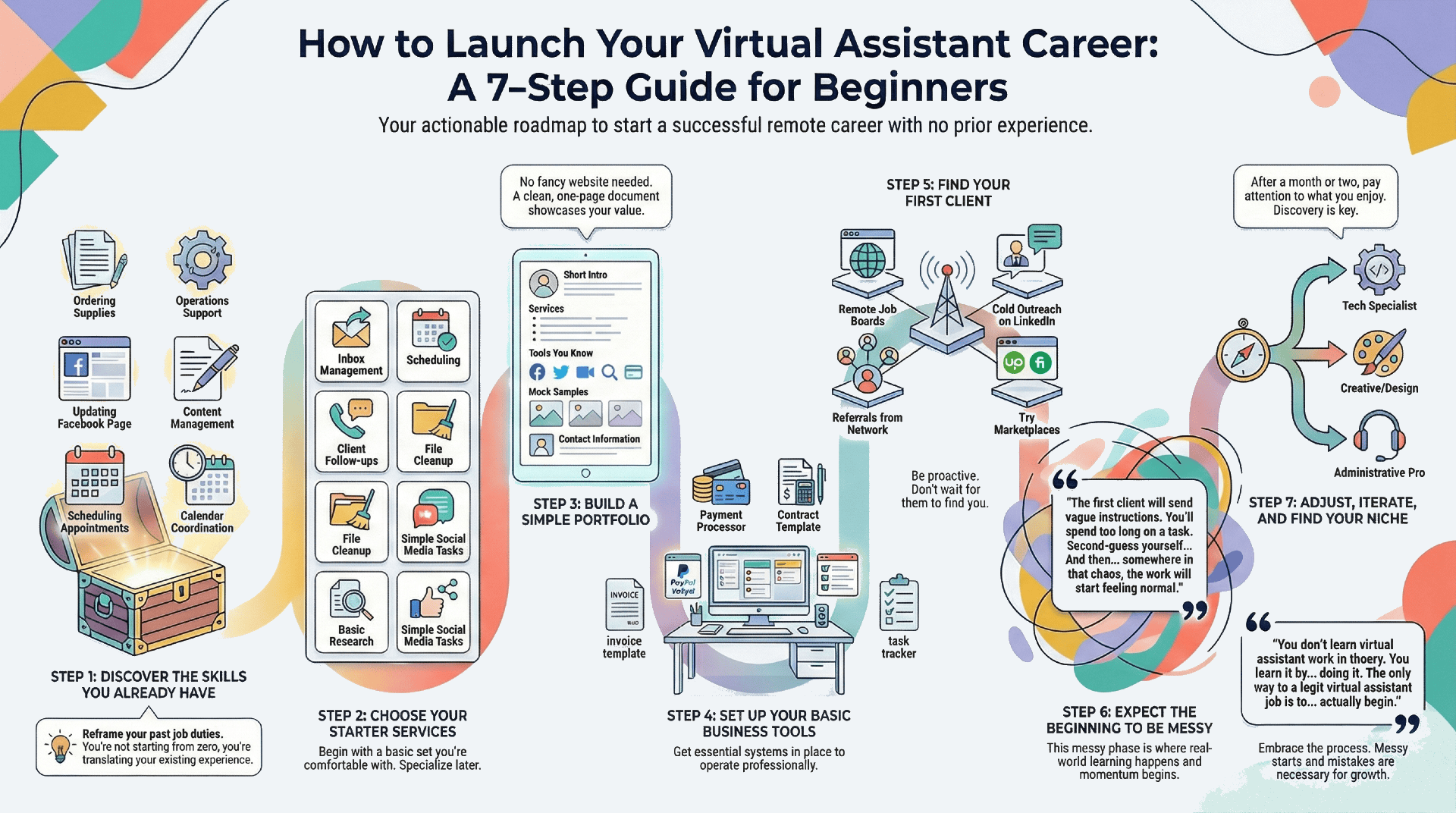
Step 1: What You Already Know
Almost everyone underestimates their skills at first. If you’ve ever answered phones, scheduled literally anything, managed an (even your own) inbox, organized files, trained a coworker, updated a snippet of a website, ran a social media post campaign, or figured out how to fix a printer jam while no one else was looking? Those can be virtual assistant job skills.
Sit down with a notebook and write out everything you’ve done in previous jobs. Even the boring stuff. Then translate it into “virtual assistant language”:
- Ordering supplies → Operations support
- Showing a new coworker the ropes → SOP creation + onboarding
- Updating the store’s Facebook page → Content management
- Scheduling appointments → Calendar coordination
- Checking expiration dates on anything → Administrative upkeep
The skills are just hiding in plain sight. Now, you’re not starting from zero.
Step 2: Pick a Set of Starter Services
Not a niche. Not a high-ticket offer. Just the basics.
Things you can do comfortably while you’re learning the rhythm of client work.
Usually, that looks like:
- Inbox management
- Scheduling
- Follow-ups
- File cleanup
- Basic research
- Simple content support
- Light social media tasks
You can specialize later. The early goal is to get experience, confidence, and a feel for what you enjoy (and what you hate).
Step 3: Create a Clean and Simple Portfolio
You do not need a website. Or hours of branding. You don’t even need a logo.
Most new virtual assistants lose two months of momentum trying to design something “professional” when a one-page Google Doc works perfectly fine.
Your starter portfolio only needs:
- A short intro about how you work
- Your starter services
- The tools you’re comfortable with
- A few mock samples (yes, mock is fine)
- Most importantly… Your contact info
Clients care less about the fanciness and more about clarity of your portfolio.
Step 4: Your Basic Business Setup
You’ll need:
- A way to take payments (PayPal, Stripe, or Square)
- A contract template
- A simple invoice template
- A system for tracking tasks (ClickUp, Notion, pick one)
A contract doesn’t have to be legal poetry. It just needs to say:
- What you’ll do
- When you’re paid
- How much notice is needed to pause or end the agreement
- Boundaries
“I’ll do whatever you need!” is not a contract. That’s how you end up working overtime on Sunday nights… for free.
Step 5: Find Your First Client
Everyone wishes there were a magic button labeled “Give me three clients now.”
There isn’t. But there are several pathways that consistently work.
Here’s how beginners actually find clients:
- Job Boards: There are remote-friendly sites that try their best to filter out scams. Also sites for diversity and inclusion jobs (like the one you’re on right now!) They’re generally safe starting points.
- Cold Outreach: Message small business owners on Instagram or LinkedIn. It can feel uncomfortable… until you land one and it doesn’t. The point is offering to help them with something, not beg them for work.
- Referrals: Your network is a metaphorical goldmine. Tell your friends, family, classmates, coworkers, whomever, what you’re doing. Almost always, people know someone else who’s overworked or overwhelmed. And they might just need your
- Marketplaces (Upwork, Fiverr): Not the best long-term career option, but they can give you practice, early testimonials, and some good stuff for your portfolio.
Most new virtual assistants find their first client by simply telling someone they’re available.
Step 6: Expect It to Be Messy
Nobody talks about this part.
- The first client will send vague instructions.
- You’ll spend too long on a task.
- Second-guess yourself.
- You will wonder if you’re not charging enough, or too much.
- Google things you didn’t know existed.
- You’ll rewrite your service list five times.
And then… somewhere in that chaos, the work will start feeling normal. Momentum builds when you feel comfortable enough to keep pushing.
Step 7: Adjust and Iterate
The most underrated skill in virtual assistant jobs: Knowing what to walk away from.
After a month or two, you’ll start noticing things:
- “I really do like inbox work.”
- “I never want to format another spreadsheet again, in my whole life.”
- “I actually enjoy talking to customers?”
- “I actually love tech! More of that, please.”
That’s how you naturally find your niche. Not by picking it upfront; but by paying attention to what drains you and what energizes you. Your business evolves with you.
No One Says This Out Loud
You don’t learn virtual assistant work in theory. You learn it on the job… by doing it.
Messy starts are normal. Mistakes are normal. Googling (everything) is normal.
Nobody becomes a “high-level” virtual assistant without being a nervous beginner first.
The only way to a legit virtual assistant job is to… actually begin.
Is a Virtual Assistant Career Really Worth It?
If you’ve made it this far, you already know more about virtual assistant work than most people scrolling TikTok trying to “manifest” a remote job. A virtual assistant job isn’t a loophole or a shortcut. It’s not passive income, and it’s definitely not the magical escape hatch from responsibility that some creators make it out to be.
But it is real.
Flexible.
Useful.
And genuinely individual work.
The Reality
Being a virtual assistant means you’re the person who brings clarity where there wasn’t any. You help overwhelmed business owners breathe again. Some days you’re knocking out simple admin tasks; other days you’re building systems that quietly keep an entire operation standing.
You get better with experience.
You grow into the work.
The job expands with you instead of shrinking your potential.
The Ceiling Is Higher Than People Think
The barrier to entry is low. Almost anyone can start. But the ceiling is surprisingly high. Reliable virtual assistants who communicate clearly and learn new tools don’t stay at “starter rates” for very long at all. The industry rewards curiosity, problem-solving, and consistency far more than degrees or fancy résumés.
And the best part? You don’t need to know everything before you begin.
In fact, no one really does.
If You’re Hesitating, Here’s Your Nudge
If you’ve been wondering whether you could actually do this, here’s your sign: You 1. don’t have to be perfect to get started. 2. don’t need your niche on day one. 3. don’t need a brand palette, a dynamic website, or a ten-step roadmap.
You just have to start. Messy beginnings are exactly how most virtual assistant jobs start.
Who knows? A year from now, you might look back and realize this was the career move you didn’t know you needed.